
Outcome-based pricing is easy to describe and hard to operationalize. The headline is simple: customers pay when your product delivers a defined result. The mechanics are a bit harder to define.
You must define the outcome, prove it happened, decide what does not count, choose dollars or credits, handle the onboarding period before outcomes flow, and make the invoice auditable.
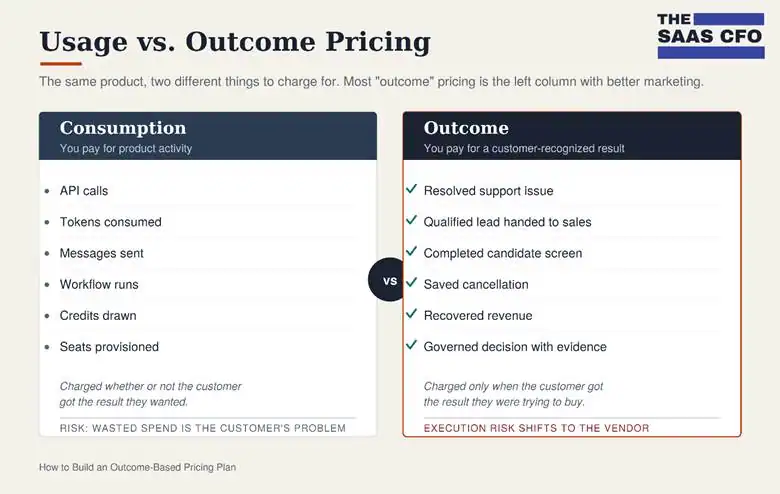
The biggest mistake is calling something “outcome-based” when it is really usage-based pricing with better marketing. Consumption pricing charges for product activity: API calls, credits, messages, workflow runs, tokens. Outcome pricing charges for a customer-recognized business result: a resolved support issue, a qualified lead, a completed candidate screen, a saved cancellation, or recovered revenue.
Sierra, a company that builds conversational AI agents for businesses, primarily for customer experience (CX) and customer service, draws the line well. Outcome pricing is tied to tangible business impact like resolved conversations, saved cancellations, and upsells, and if the conversation is unresolved there is generally no charge. That is the standard to use. Outcome pricing is not “the AI did something.” It is “the customer got the result they were trying to buy.”
This guide covers twelve design decisions, each with an action item, plus a pricing page template you can fill in.
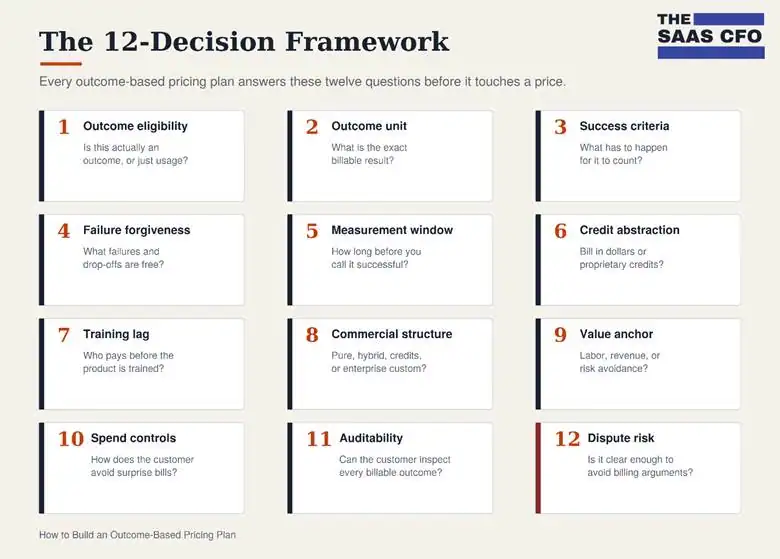
1. Decide Whether You Actually Have an Outcome
Ask whether your metric is tied to a completed customer result or just product activity. A resolved issue, completed screening, qualified lead, or saved subscription can be an outcome. An AI reply, workflow run, or API call is usually consumption.
HubSpot shows true outcome framing. Breeze Customer Agent moved to $0.50 per resolved conversation and Breeze Prospecting Agent to $1.00 per lead recommended for outreach. The customer pays when the agent completes the task, not when the system generates output.
Action item: Write this sentence before touching your price. “The customer only pays when ______ is successfully completed.” If the blank describes internal product activity, you have usage pricing. If it describes a result the customer already values, you may have a real outcome.
2. Define the Outcome-based Pricing Unit
The outcome unit is the atomic billing event. It should be easy to count and tied to a workflow the customer already cares about. Intercom Fin charges $0.99 per outcome, where an outcome is Fin resolving an issue end to end or executing a configured procedure. Help Scout uses a narrower unit: one AI resolution, a single chat session resolved without a human, charged once per session.
The best units map to the buyer’s operating model. A support leader thinks in cost per resolved conversation, a recruiter in cost per completed screening. The unit should sound like something already on a KPI dashboard.
Action item: Map your own outcomes using the four columns below: workflow, the weak unit you might default to, the better outcome unit, and why it works. The table shows five common patterns. Build the same four columns for your product, one row per workflow you want to charge for.
| Workflow | Weak Unit | Better Outcome Unit | Why It Works |
| AI support | AI response | Verified resolved conversation | Customer pays for deflection, not effort |
| AI recruiting | Candidate contacted | Completed screening or scorecard | Customer pays for usable hiring output |
| AI sales | Contact enrolled | Qualified lead recommended to sales | Customer pays for pipeline-ready work |
| AI retention | Cancellation flow started | Membership saved or plan changed | Customer pays for retained revenue |
| AI governance | Policy check executed | Governed decision with audit evidence | Customer pays for risk control |
3. Define Success Criteria, and Define Them Twice
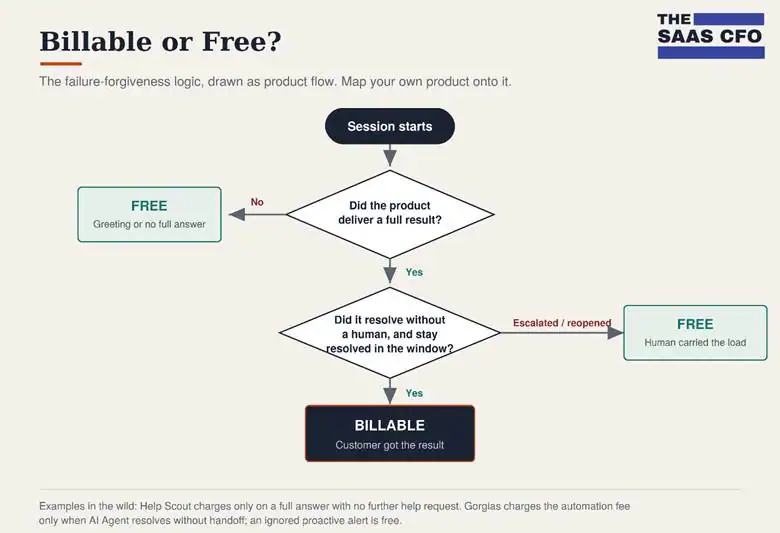
For self-serve and mid-market products, write success criteria like product logic. Help Scout charges when AI Answers gives a full response and the customer does not ask for more help. It does not charge for greetings, follow-up questions without an answer, or when the customer requests help. Zendesk is more formal: resolutions count when AI resolves the issue without human intervention with LLM verification confirming the request was satisfied.
For enterprise products, criteria often cannot live on the pricing page. It’s just too complex. Sierra agrees on outcome criteria with each customer upfront, treats simple and complex resolutions differently, and uses blended pricing when an interaction does not fit. At enterprise scale, the same word or resolution can mean different things for a fintech, an ecommerce brand, or a healthcare provider, so success becomes a negotiated definition on the order form rather than a line on the pricing page.
Action item: Create two definitions of success. Product definition: “A billable outcome occurs when [system action] produces [customer-recognized result], without [failure condition], within [measurement window], verified by [data source].” Enterprise definition: “For this customer, a billable outcome means [custom result], excluding [customer-specific exclusions], measured by [agreed system of record], subject to [dispute process].”
4. Build in Failure Forgiveness
Failure forgiveness is a conversion tool, not just billing logic. Customers try outcome pricing because they are insulated from execution risk. If the product fails, escalates, stalls, or the user abandons the flow, the customer should not pay. Eximius, an AI recruiting platform, makes drop-offs and no-shows free. Docspeed, a document intelligence platform, draws zero credits on failed, cancelled, or disconnected runs. The buyer needs to see exactly what they will not pay for.
Action item: Add a “You are not charged when…” section to your pricing page and order form. Include abandoned sessions, escalations, failed workflows, greetings, diagnostic questions, no-shows, duplicate messages in the same session, and test or sandbox usage.
5. Use a Measurement Window
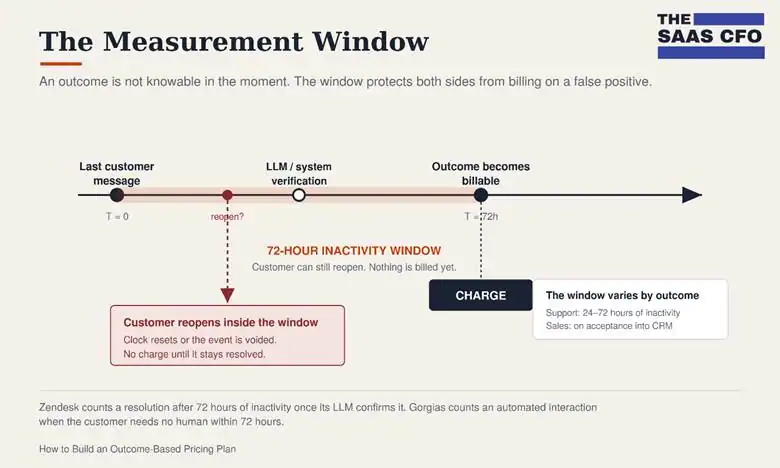
Many outcomes are not knowable in the moment. A customer can look satisfied and reopen the issue two hours later. A lead can look good until sales rejects it. Bill too fast and customers feel like they are paying for false positives.
Support shows a clear 72-hour pattern. Zendesk counts an automated resolution after 72 hours of inactivity once its LLM confirms the issue was resolved. Gorgias counts an automated interaction when the customer does not need a human within 72 hours. The correct time window depends on the outcome: support may need 24 to 72 hours, lead qualification may count on CRM acceptance, recruiting when the candidate completes the screen.
Action item: Define five timing rules before launch. When the session starts, when it ends, how long you wait before billing, what happens if the customer reopens or reverses the event, and whether a reopened event is new or a continuation.
6. Decide Whether to Bill in Dollars or Credits
Some companies publish simple dollar prices: Intercom at $0.99 per outcome. Help Scout at $0.75 per resolution. Others use credits to abstract price across multiple outcome types. HubSpot uses 50 credits per Customer Agent resolution and 100 per recommended lead. Eximius bundles 300, 1,000, or 2,500 monthly credits into plans, with unused credits rolling over while the account stays active.
Credits help when you have multiple outcome types at different value levels. Credits hurt when an unclear conversion rate obscures what the buyer is actually paying for.
Action item: Make an explicit currency decision. Use dollars when the outcome is simple and uniform. Use credits when you have multiple outcome types, complexity levels, bundles, rollover, or prepaid commitments. If you use credits, publish the conversion logic and show examples in plain dollars.
7. Plan for the Training Lag
Outcome pricing assumes the product produces outcomes immediately. AI products often cannot produce immediate outcomes. They need data, knowledge base cleanup, configuration, and tuning. So, who pays during the ramp when outcomes are low?
Help Scout solves it on the customer’s side with a free three-month trial to train AI Answers before charges begin. Sierra notes the first weeks of deployment involve iteration before performance stabilizes. There is no universal answer, but the mistake is pretending the lag does not exist.
Action item: Choose one of three onboarding models. Low-touch: a free training window before charges begin. Mid-market: a limited pilot with capped free outcomes and clear conversion rules. Enterprise: an implementation fee, annual minimum, or pilot credit that funds onboarding and states when billing starts.
8. Choose the Commercial Structure
Outcome pricing does not have to mean pure pay-as-you-go. Most strong models are hybrids, because pure outcome pricing creates revenue volatility for you and budget anxiety for the customer.
| Structure | Example | When It Works |
| Pure outcome pricing | Intercom Fin at $0.99 per outcome, with minimum commitments in some deployments | High-volume, measurable, low-dispute workflows |
| Pay-as-you-go add-on | Help Scout at $0.75 per AI resolution, billed in arrears | Outcome feature attached to an existing SaaS platform |
| Subscription plus outcome credits | Eximius monthly plans with included outcome credits and rollover | Predictable MRR plus usage-based expansion |
| Hybrid platform plus outcome fee | Gorgias helpdesk ticket fee plus AI Agent automation fee | Platform has base value and automation adds incremental value |
| Enterprise custom outcome pricing | Sierra custom outcome criteria and blended pricing | Complex workflows where success varies by customer |
| Dual-choice model | Decagon offers per-conversation and per-resolution options | Buyers differ in tolerance for dispute risk and budget variability |
Gorgias, a customer-experience platform built specifically for ecommerce, shows both the power and the risk of hybrids. A single interaction can generate a helpdesk ticket fee plus an automation fee when AI Agent fully resolves the ticket. If the AI escalates to a human, only the ticket fee applies. If a proactive alert is ignored, no fee applies.
Action item: The table above lays out six commercial structures and where each one fits. Pick the row that matches your product, then write down the tradeoff you are accepting. Pure outcome is clean but less predictable. Subscription plus outcome is stable but must avoid the perception of double charging. Enterprise custom pricing improves fit but adds sales and legal complexity.
9. Anchor Price to the Type of Value Created
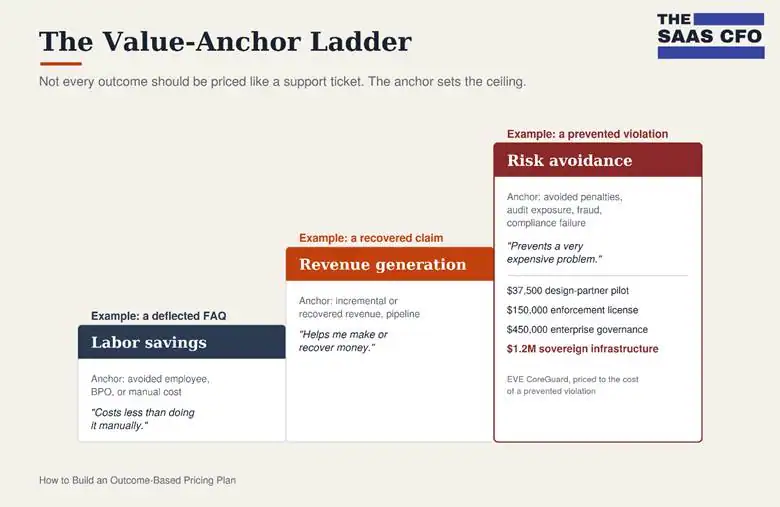
Separate value anchors into three categories: labor savings, revenue generation, and risk avoidance. Most teams default to labor savings because it is easiest to explain: if a human resolution costs $5 and your AI resolution costs $1, the customer keeps $4. It’s a good anchor, but not the only one.
Revenue generation supports a higher anchor. Revenue Stream AI, which automates healthcare revenue cycle work, prices around recovering earned revenue, reducing denials, and closing coding gaps. It combines a monthly platform fee with per-execution billing on each automation module, and positions that explicitly against the industry-standard percentage-of-collections model.
Risk avoidance supports the highest anchor. EVE CoreGuard, a governance infrastructure product for regulated AI, prices against the cost of a prevented regulatory violation with tiers running from a $37,500 design partner pilot to a $1.2 million sovereign infrastructure license.
Action item: Use the three value types in the table below to classify your outcome before setting a price. Decide whether the buyer logic is labor savings, revenue generation, or risk avoidance, because each one supports a very different ceiling. Do not price a saved cancellation or an avoided regulatory issue like a deflected FAQ.
| Value Type | Pricing Anchor | Typical Buyer Logic |
| Labor savings | Avoided employee, BPO, or manual processing cost | “This costs less than doing it manually.” |
| Revenue generation | Incremental or recovered revenue, conversion lift, pipeline created | “This helps me make or recover money.” |
| Risk avoidance | Avoided penalties, audit exposure, downtime, fraud, compliance failure | “This prevents a very expensive problem.” |
Do not price every outcome like a support ticket. A saved cancellation, recovered claim, or avoided regulatory issue can justify a very different number than a deflected FAQ.
10. Add Spend Controls Before Customers Ask
Outcome pricing lowers adoption risk because customers only pay when it works. It also creates budget anxiety: if it works very well, the invoice grows fast. This can cause big CFO anxiety. Spend controls are a conversion feature, not a finance feature.
Help Scout lets admins set a monthly limit by number of resolutions and disables AI Answers when the limit is hit. Zendesk lets customers add committed usage, authorize overages, or cap automated resolutions. Eximius offers top-up packs for spikes, with credits that roll over.
This is a fascinating area. Can you turn off the outcome when your customer hits a cap and shift the workflow to a human? That would get some attention internally.
Action item: Launch with at least five controls: a usage dashboard, a monthly cap, threshold alerts, overage rules, and a pause behavior at the cap. For mature plans, add committed-usage discounts, prepaid credits, top-up packs, rollover, and finance-admin permissions.
11. Make Every Outcome Auditable
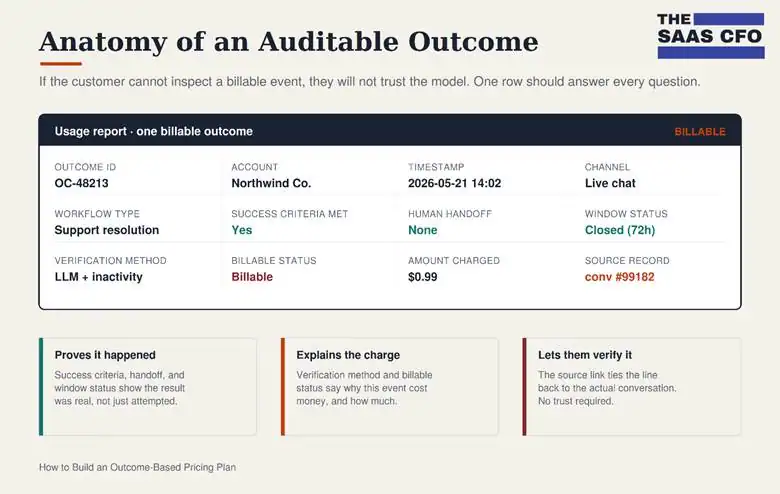
Outcome pricing creates a trust problem because the vendor defines, measures, and invoices the outcome. If customers cannot inspect the billing events, they will not trust the model.
Help Scout lets admins review billable AI conversations in reporting. EVE CoreGuard goes the furthest with signed, re-playable decision certificates for regulated workflows. At minimum, the customer should be able to inspect every billable event, why it was billable, and the source record behind it.
Action item: Design the customer-facing usage report before launch. Fields: outcome ID, account, timestamp, channel, workflow type, success criteria met, human-hand off status, measurement-window status, verification method, billable status, non-billable reason, amount charged, and a link to the source event. For enterprise customers, add a dispute process and credit-reversal rule.
12. Know When Not to Use Outcome Pricing
Outcome pricing is powerful when success is clear, attributable, and auditable. It gets dangerous when success is subjective, delayed, or easy to dispute. If a frustrated customer stops responding, is that resolved? If a lead is recommended but sales never works it, did you create value?
This is why some companies hedge a bit. Decagon, a company that builds autonomous AI agents for customer service, offers both per-conversation and per-resolution pricing, and says most customers choose per-conversation because it is predictable and avoids arguing over what counts as a resolution. The lesson is not that outcome pricing is always better. It is best when the success event is clean enough that both sides agree on it almost every time.
Action item: Run a dispute-risk test on every outcome you plan to bill. Ask: would the customer, your analytics, and your billing records all support calling this a success at least 95% of the time? If not, the outcome is too easy to dispute. Fix it before launch by tightening the definition, adding verification, lengthening the measurement window, adding a credit-review process, or pricing that workflow with a simpler usage metric instead.
A Practical Pricing Page Template
A good outcome-based pricing page does not just list the price. It explains the mechanics clearly enough that a CFO, RevOps leader, or procurement team can understand how the invoice gets created.
Headline: Pay only when the work gets done.
Outcome definition: A billable outcome occurs when [product] completes [specific customer-recognized result] without [failure condition] within [measurement window].
Billable examples: You are charged when the AI resolves an issue without human help, recommends a qualified lead, completes a screening, or saves a cancellation.
Non-billable examples: You are not charged when the workflow is abandoned, the customer requests human help, the AI only greets the user, the workflow fails, the candidate no-shows, or the issue is reopened inside the measurement window.
Pricing: $X per outcome, or Y credits per outcome. Includes Z outcomes per month. Overage is $A per additional outcome. Unused credits [roll over / expire]. Customers can set a monthly cap.
Controls: Admins can view usage, inspect billable events, set monthly limits, receive alerts, buy top-ups, and pause automation before overages occur.
Auditability: Every billable event includes a timestamp, customer record, workflow type, billable reason, verification method, amount charged, and source link.
Final Takeaway
Outcome-based pricing is not just a pricing model. It is a trust architecture. The customer agrees to pay only when your product produces value for them, which means you have to define “works” with precision.
For operators, the goal is not to say, “we offer outcome-based pricing.” It is to build a model where the customer looks at the invoice and says: “I understand exactly what I paid for, I can verify it happened, and I only paid when the product delivered the result.”

I have worked in finance and accounting for 25+ years. I’ve been a SaaS CFO for 9+ years and began my career in the FP&A function. I hold an active Tennessee CPA license and earned my undergraduate degree from the University of Colorado at Boulder and MBA from the University of Iowa. I offer coaching, fractional CFO services, and SaaS finance courses.